Pinterest 允许家长限制青少年浏览 AI 生成内容
Pinterest 本周扩展家长控制功能,新增可调节青少年接触 AI 生成内容比例的设置,成为首批将 AI 内容曝光量交由家长管理的主流社交平台之一。该功能与通知调节、视频自动播放开关等常规选项一同上线,并重新设计了家长控制页面。其他平台目前多聚焦于限制未成年人使用特定 AI 功能,而非控制 AI 内容曝光。
报道正文
Pinterest announced this week that it’s expanding its parental controls, but one new feature stands out: parents can now control how much AI-generated content their children are exposed to. This additional setting arrives alongside more standard options, like tools to adjust notifications or whether or not videos autoplay.
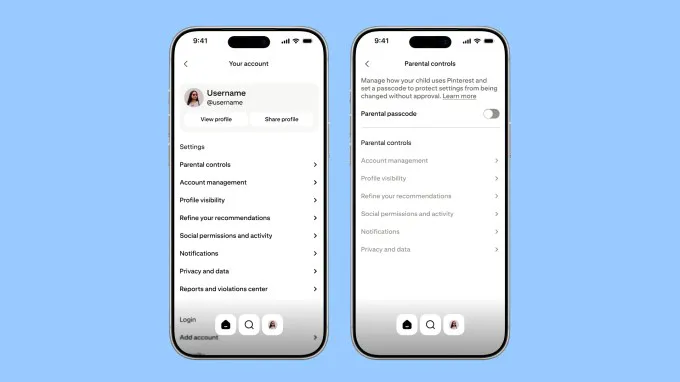
Image Credits:Pinterest
The change makes Pinterest one of the first major social platforms to allow parents to control how much AI-generated content is shown to their children as part of the overall user experience.
Aside from Pinterest, social media platforms have focused more on limiting minors’ access to specific AI-powered features, as when Snap added a parental control setting that prevented its AI chatbot from responding to teens or when Meta did when it announced a global pause on teens’ access to existing AI characters after retooling the product based on parents’ feedback.
WhatsApp currently allows parents toadjust the level of access teens have to Meta AI, in terms of using AI to create content or having the AI respond to their teen’s questions.
But when it comes to AI-generated content filling users’ feeds and recommendations, there are few controls available on social media platforms in general, much less those provided as part of the parental controls.
This problem, parents say, is harming children’s well-being in favor of profits. For instance, in April, the children’s advocacy group Fairplay sent a letter to YouTube CEO Neal Mohan and Google CEO Sundar Pichai, signed by over 200 organizations and experts, calling on YouTube to remove AI-generated content from YouTube Kids and bar AI-generated videos from being recommended to users under 18.
Pinterest has fought its own battle against AI content, which still finds its way into users’ feeds even when the settings that restrict AI-modified content, which the company introduced in 2025, are enabled.
Putting a similar set of tools into parents’ hands is at least a good first step in allowing the users themselves to dictate the type of experience they want to have on the app.
The new feature arrived alongside other parental controls, including one to stop auto-playing videos and another that lets parents adjust the volume of push, browser, in-app, and email notifications. The Parental Controls Page was also redesigned to make it easier to find and configure certain controls and to allow parents to configure settings related to personalized ads.